
Professional fireworks software
See the show in 3D before show night.
Preview every cue in a browser-based 3D fireworks simulator with music, sound, wind and the real site around you, then export the show as video.
Request beta accessOmniPyro is in beta. Access is approved before you start.
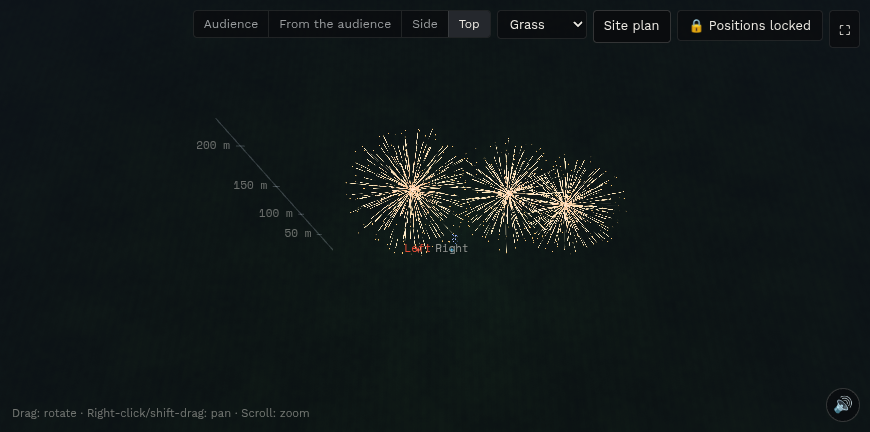
A fireworks simulator that runs in the browser
OmniPyro simulates the show with its own WebGL particle engine, so there is nothing to install. Shells rise to their height and break with the calibre-based size, cakes fire tube by tube in their row pattern, and comets, mines, fountains, flames, fireballs and bengal lights are simulated from the ground.
Effects are built from the product's effect description (VDL) or from an effect line written in plain English, such as "gold brocade crown with red comets". Colour changes, ghost sweeps, crossettes, strobes, glitter, crackling, time rain, palms and pistils are shown as separate parts of the same effect.
Wind, sound, music and the real site
Every shot has small, repeatable variations in timing, angle and height, and the wind from the site plan drifts the stars. Lift, break, crackle and whistle sounds are synthesised for each calibre, and the show plays in sync with the music track.
Switch between front, side, top and audience view. The ground can be grass, satellite imagery, a map or water with reflections, and buildings and trees around the site can be loaded from OpenStreetMap.
Share the preview
Export the show as an MP4 video at up to 4K and 60 frames per second with fireworks sound and music. A locked show can also be shared as a customer link that plays the 3D visualisation in the browser without showing prices or product data.
How the workflow fits together
- Place products from your inventory on the timeline at the positions on the site plan.
- Play the show in 3D with music and check angles, heights and timing.
- Export a video or share a customer link once the show is locked.
Questions about this workflow
Do I need to install anything to simulate a fireworks show?
No. The 3D simulation runs in a modern browser on a computer or tablet. A computer with a graphics card gives the smoothest playback for large shows.
Can I export the 3D preview as a video?
Yes. The show can be exported as an MP4 video from 720p up to 4K at 30 or 60 frames per second, with fireworks sound and the music track.
How does OmniPyro know what each product looks like?
It reads the product's effect description (VDL), the effect line you write yourself or a product built in the Product creator. The simulation is a visual aid, not a guarantee of how a real product performs.