
Professional fireworks software
Take one checked plan into show preparation.
Connect the timeline, firing assignments, printed labels and crew information to the version you intend to use.
Request beta accessOmniPyro is in beta. Access is approved before you start.
Prepare the script for the selected firing system
A finished timeline needs a working script that matches the chosen firing system and the equipment on site. OmniPyro connects the show with its positions, product selection and firing assignments so the script and preparation documents share the same planning information.
Export workflows include COBRA 18R2, fireTEK and FireOne. Crackle Cube support provides a file workflow for supported ordinary timed cues. System-specific limitations and the actual hardware configuration still need to be checked; exporting a file is not direct firing from the browser.
Keep the crew on the intended version
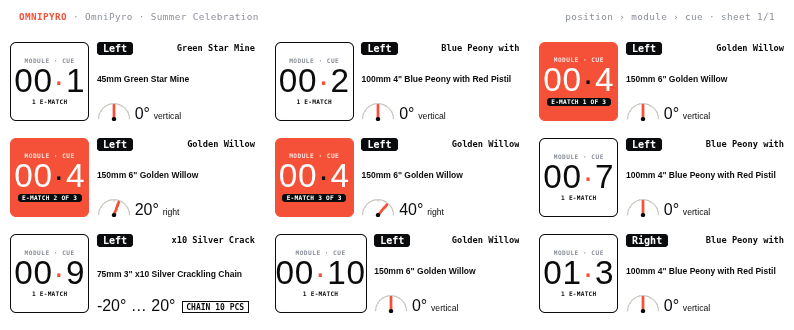
Print cue labels and use the rack, packing and module information to prepare the show. The labels should be checked against the actual wiring and hardware, particularly when products are linked in chains or a plan uses system-specific addressing rules.
A locked show and its control code help the crew identify the intended version. The crew link provides the relevant show information, with offline preparation available through the existing workflow. Exported scripts should always be tested with the selected system and the operator's procedures before use.
How the workflow fits together
- Review the finished timeline, positions and firing assignments.
- Lock the intended version and generate the relevant script and labels.
- Check the export against the hardware setup and share the intended version with the crew.
Questions about this workflow
Which systems have export workflows?
OmniPyro includes workflows for COBRA 18R2, fireTEK and FireOne, plus a Crackle Cube file workflow for supported timed cues. Check each system's format and supported cue types before use.
Does OmniPyro fire the show directly?
This workflow prepares script files and show documents. It does not claim a direct firing connection from the website to every firing system.