
Professional fireworks software
Keep your fireworks inventory connected to the show.
Manage products and quantities, then use the same inventory when planning the site and designing a show.
Request beta accessOmniPyro is in beta. Access is approved before you start.
Bring product information into one inventory
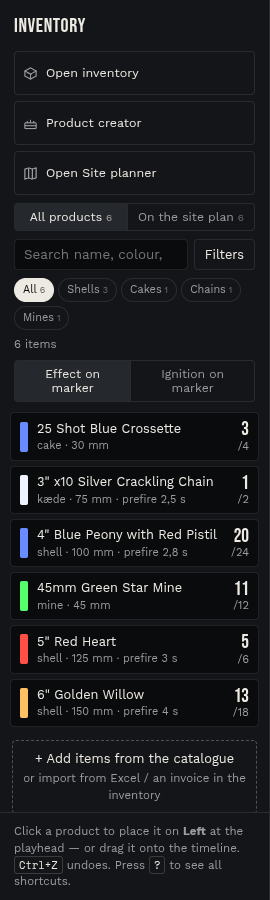
Professional show planning depends on knowing which products are available and how they are described. OmniPyro keeps the company's inventory in the same workspace as site planning and show design. Search and filter the products when choosing what belongs in a plan.
Import spreadsheet product lists and review the result before saving changes. The document import tools can also help read supplier information. Check quantities, product matches and other imported fields in the preview; an import does not remove the need to verify the supplier's source data.
Use the selected stock through the planning workflow
Select products and quantities for a site plan, then continue to the show timeline. The inventory panel distinguishes the overall inventory from the products on the current site plan, helping the designer work with the intended selection.
For a product with its own construction, Product creator can retain a native cake definition alongside its inventory entry. The same effect information is then available to the 3D preview. Keeping the stock and design data together reduces the number of separate lists a team needs to reconcile.
How the workflow fits together
- Import a product list or add and review products in the company's inventory.
- Use search and filters to select products and quantities for the site plan.
- Open the related show and work with the inventory selected for that plan.
Questions about this workflow
Can I import an Excel list?
The inventory supports spreadsheet imports, including Excel and CSV workflows, with a preview before saving. Review the mapping and quantities before applying changes.
Is the inventory shared by the company?
The inventory belongs to the company workspace. Team access follows the company's users and roles.